
Cloud Sync & Account
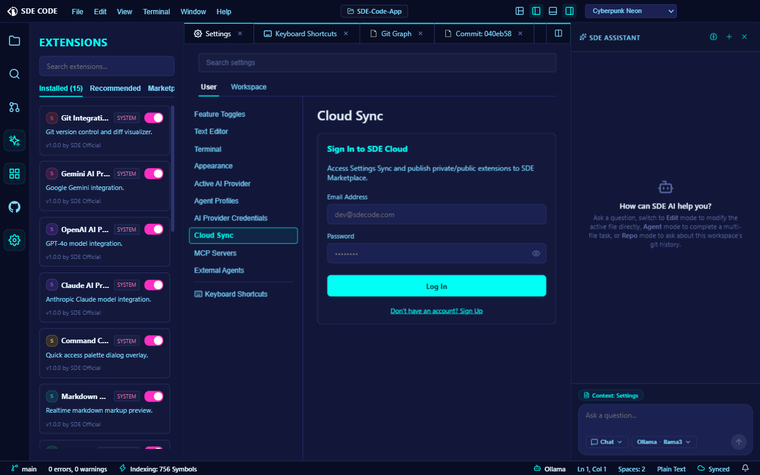
A separate account from GitHub sign-in
Cloud Sync uses its own email/password account, independent of the GitHub sign-in used for PR/issue review. Register, log in, or delete your account from Settings → Cloud Sync. Your session token is stored in Electron’s encrypted safeStorage, not in plain browser storage.
Syncing settings
With an account signed in, Settings → Cloud Sync gives you an Enable Sync toggle plus manual Push and Pull buttons (there’s no automatic background sync — you decide when).
- Push uploads your current settings, keybindings, enabled-extensions list, and custom snippets as one profile.
- Pull downloads that profile and applies it locally — settings and keybindings are written over your current values, and extensions get enabled/disabled to match the list from the server.
Pull it on a new machine (or after a reinstall) to get your setup back in one step.
Edit Sessions — syncing uncommitted changes
Separate from settings sync entirely: the Source Control panel’s Edit Sessions section lets you back up your current uncommitted working-tree diff to the cloud, so you can pick it up from another machine or session — without committing or opening a PR just to move work-in-progress around.
Click Backup Uncommitted Changes to push your working-tree diff. It’s capped around 500KB; past that you’re asked to commit or stash first rather than syncing an ever-growing diff. On another session, a banner appears — “Pending changes available from <time> ago” — with Apply (applies the diff via git apply and clears it) or a dismiss button. Nothing is ever applied automatically.
Both features render nothing if you’re signed out.